There are three well-known techniques in creating a website layout using CSS:
- The <table/> approach.
- The <table/> + <div/> hybrid approach.
- The pure <div/> approach.
- The positioning approach of absolutists v. relativists; and,
- The clearing float (or is it the floating clear? <smile/>).
There are others of course; very advanced CSS masters like to further enhance the cleanliness of their XHTML code without using a single <div/> or <span/>.
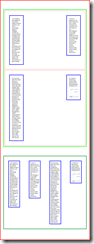
As I jumped into refresher exercises, I wondered: "How easily would it be for me to do this (ref: screen)?" Or, "Is it even possible to easily do it for the four popular browsers today?"
Warning: At the time of writing, the following materials were only proofed on:
- Internet Explorer 7.0.6001.18000
- Firefox 3.0.6
- Safari 3.2.2 (525.28.1)
- Chrome 1.0.154.48
This article merely documents these variations and choices. We do not advocate one approach versus another as these choices are left to each of our individual circumstances and reasons. Although <grin/> I would soon give up doing the first approach.
The base skeletal structure for each of the tested approaches is the following Listing 1(with slight differences):
Listing 1:
<!--xml version="1.0" encoding="UTF-8"?-->
<!--DOCTYPE html
PUBLIC "-//W3C/DTD XHTML 1.0 Transitional//EN"
"http://www.w3.org/TR/xhtml11/DTD/xhtml1-transitional.dtd"-->
<html>
<head>
<title>DIV</title>
<style type="text/css" media="all">
/* Section: Initialization
**********************************************************************/
* {
margin: 0px auto;
padding: 0px;
outline: 0
border: 0 none;
font-family: cambria, georgia, "Times New Roman", times, serif;
font-size: 11pt;
font-style: inherit;
font-weight: inherit;
vertical-align: baseline;
text-decoration: none;
/* Set min-height to "100%" and overflow to "auto" in order to set
* the div box to stretch to the height of its children elements. This
* setting bears no effect whatsoever on IE.
**********************************************************************/
min-height: 100%;
/* Use // to give a specific instruction to IE browser only
**********************************************************************/
}
}
body {
padding: 10px;
}
h1, h2, h3, h4, h5, h6, p, pre, blockquote, form, ul, ol, dl {
margin: 20px 0;
}
ul, ol, dl {list-style: none;}
table, tr, td {
border-spacing: 0;
}
a img, :link img, :visited img, {
border: 0 none;
vertical-align: bottom;
}
code, .code{
padding: 10px;
padding-left: 15px;
font-family: consolas, monaco, "Courier New", courier, monospace;
font-size: 9pt;
color: rgb(100,100,100);
white-space: pre;
text-align: left;
}
/* End Section
</style>
</head>
<body>
...
</body>
</html>
The <table/> approach
If we search the Internet for arguments against using <table/> tags for layout purposes, we will find them in abundance. They are all valid arguments and we should heed them. I simply could not bring myself to nest <table/> tags like it's 1999.
The <table/> + <div/> approach
For the following simple layout in Listing 2:
Listing 2:
<body>
<table>
<tr>
<td id="t11-21">
<div id="d11-21" class="d11-2">
</div>
</td>
<td id="t11-22">
<div id="d11-22" class="d11-2">
</div>
</td>
</tr>
<tr>
<td id="t11-23">
<div id="d11-23" class="d11-2">
</div>
</td>
<td id="t11-24">
<div id="d11-24" class="d11-2">
</div>
</td>
</tr>
</table>
<table>
<tr>
<td id="t12-21">
<div id="d12-21" class="d12-2">
</div>
</td>
<td id="t12-22">
<div id="d12-22" class="d12-2">
</div>
</td>
<td id="t12-23">
<div id="d12-23" class="d12-2">
</div>
</td>
<td id="t12-24">
<div id="d12-24" class="d12-2">
</div>
</td>
</tr>
</table>
</body>
We still had the following styling code in Listing 3
Listing 3:
/* Section: Content specific
**********************************************************************/
body, #doc {
width: 100%;
border: 5px double rgb(255,0,0);
//padding-bottom: 100px;
}
table {
width: 948px;
border: 5px solid rgb(0,255,0);
margin: 100px;
/* Set margin-{left, right} to &quot;auto&quot; to center the div box because
* setting text-align to &quot;center&quot; at the container level only works
* with IE but not with other browsers, in addition to having the
* unintended effect of having the container's text actually centered
* that is if we simply just want the layouts centered, not its text.
**********************************************************************/
margin-left: auto;
margin-right: auto;
table-layout: fixed;
}
/* TR styling doesn't work on IE
************************************************************************/
tr {
width: 928px;
border: 5px solid red;
display: block;
}
td {
vertical-align: top;
}
#t11-21, #t11-23 {width: 100%;}
#t11-22, #t11-24 {text-align: right;}
#t11-21, #t11-22, #t11-23, #t11-24 {
//width: 50%;
border: 1px solid blue;
}
#t12-21, #t12-22, #t12-23, #t12-24 {
width: 25%;
text-align: center;
border: 1px solid blue;
}
div.d11-2, div.d12-2 {
border: 5px solid rgb(0,0,255);
margin: 50px;
}
#d11-21, #d11-22, #d11-23, #d11-24
, #d12-21, #d12-22, #d12-23, #d12-24 {
text-align: left;
width: 100px;
padding: 25px;
overflow: visible;
}
#d12-21, #d12-22, #d12-23, #d12-24 {
padding: 10px;
//margin-left: 0px;
//margin-right: 0px;
}
/* End Section
************************************************************************/
Yes, this approach yields a slightly cleaner code result than only the <table/> based approach. But it isn't without its own problems. There's that <tr/> rendering issue in IE. And of course, I found that the CSS implementation differences between the various browsers render this approach virtually indefensible, as in saying: "If we have to resort to using various CSS tricks/hacks anyway, why not simply do a Table-less Layout with its pros and cons already weighed by the web design community at large, especially when we already have ample samples written by masters such as those from A LIST apart and Zen Garden—two sources of my favorites reading materials where I found a wealth of knowledge shared to us all common netizens."
Need I say more?
Up next: The pure <div/> approach (Part 2).
 be enough to make us try to think of a new, more "Excel-worthy" technique? I certainly thought so.


